Employee 30-60-90 Onboarding Checklist & Skills Certification Matrix
30-60-90 day onboarding tasks with due dates and completion %, a 0-4 skills matrix with gaps, and certification expiry tracking.
What This Workbook Does
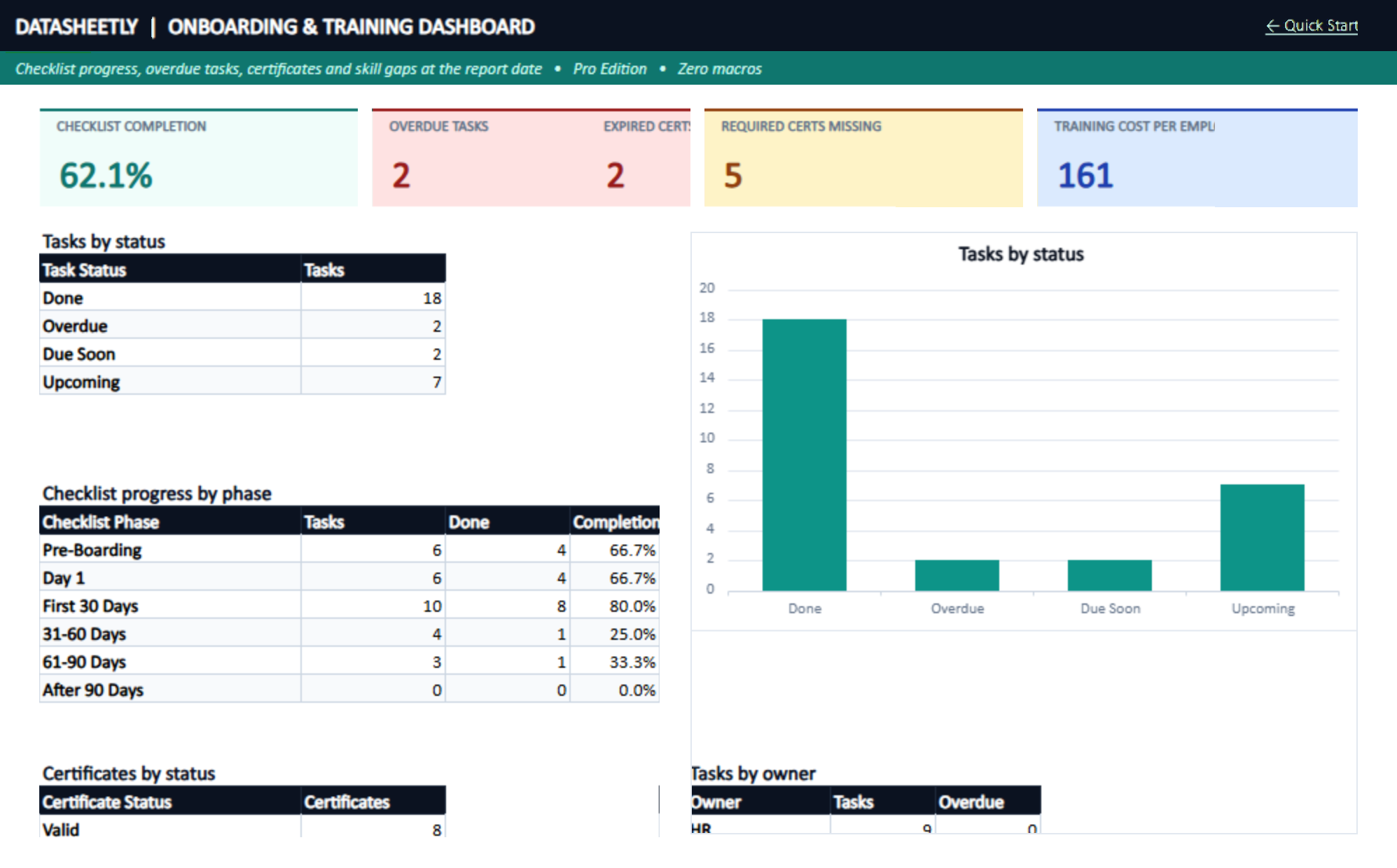
Onboarding task checklist: each task's due date is the hire's start date plus its day offset, with a status of Done, Overdue, Due Soon or Upcoming at the report date
Per-hire completion %, current phase (first 30, 31-60, 61-90 days), overdue task count and an On Track / Behind / Complete status
Skills log scoring each person 0 (none) to 4 (can train others) against a target level, with the gap calculated
Skills matrix grid of skills by employee with people trained (level 3+), trainers and a coverage flag for skills only one person (or nobody) can do
Certification register with expiry dates: days to expiry and a Valid / Expiring Soon / Expired / No Expiry status using your warning window
Required certifications by department: employees without a valid certificate are counted as missing, per requirement and per employee
Training cost per employee from the certification costs you log, and cost per employee trained on the dashboard
90-day probation readiness: Ready only when the review score, checklist completion and required certifications all meet the limits in Settings
Worksheets Included
10 TabsUniversal Windows & Mac support with dynamic arrays
Runs in browser on office.com with free Microsoft account
Pure .xlsx formulas. Never blocked by corporate IT antivirus
Receive both a clean blank file and pre-filled sample rows
Frequently Asked Questions
Does this template require enabling macros or VBA code?
No. All Datasheetly templates are 100% macro-free (.xlsx). They rely on native modern Excel formulas (XLOOKUP, SUMIFS, LET), never trigger antivirus blocks, and are completely safe for corporate computers.
Are there any recurring subscriptions or extra fees?
None whatsoever. You make a single one-time payment of $9 and own the DRM-free Excel workbook files forever. No monthly recurring charges, no per-seat fees, and no cloud lock-in.
What software versions are required to run this workbook?
Datasheetly workbooks are engineered for modern Microsoft Excel: Microsoft 365 (Windows & Mac), Microsoft Excel 2021+, and Excel for Web (free online via office.com with any Microsoft account). Because our models leverage modern dynamic array formulas (LET, XLOOKUP, FILTER, SUMIFS) and native Excel structured tables, they are designed exclusively for Excel. Older legacy releases (Excel 2019/2016) and third-party spreadsheet viewers do not support these modern formula engines.
Do I receive clean blank files for my company data?
Yes! In your download vault, you receive two separate workbooks: a Sample Data Workbook (with realistic pre-filled rows to inspect formulas) and a Clean Blank Workbook (with all formulas and formats ready for your live data).
What if the template doesn't meet my business needs?
Every purchase is backed by our 30-Day Defect & Satisfaction Guarantee. If any formula fails or the template does not perform as documented, simply contact support for an immediate resolution or refund.
Customer Reviews & Ratings
Real feedback from verified purchasers and small business operators.
Be the First to Review This System
Tested this workbook in your company operations? Share your review or formula suggestions directly with our engineering team to help fellow operators.
Datasheetly spreadsheet workbooks and templates are operational productivity calculation tools provided for informational purposes only. They do not constitute certified public accounting (CPA), legal, tax, or medical advice. Templates are not certified or intended for the storage of protected health information (PHI) under HIPAA regulations or fiduciary client trust accounts without independent compliance review. Users are advised to review all financial and operational outputs with a licensed CPA, attorney, or qualified professional before taking formal financial or operational actions.